
Simo Ahava
Husband | Father | Analytics developer
simo (at) simoahava.com
Clarification On GTM Auto-Loading Google Tag For Ads And Floodlight Events
March 12, 2025 in Analytics | 82 Comments
Google Tag Manager users received an email on March 11th, where Google announced a very cryptic update to Google Tag Manager:
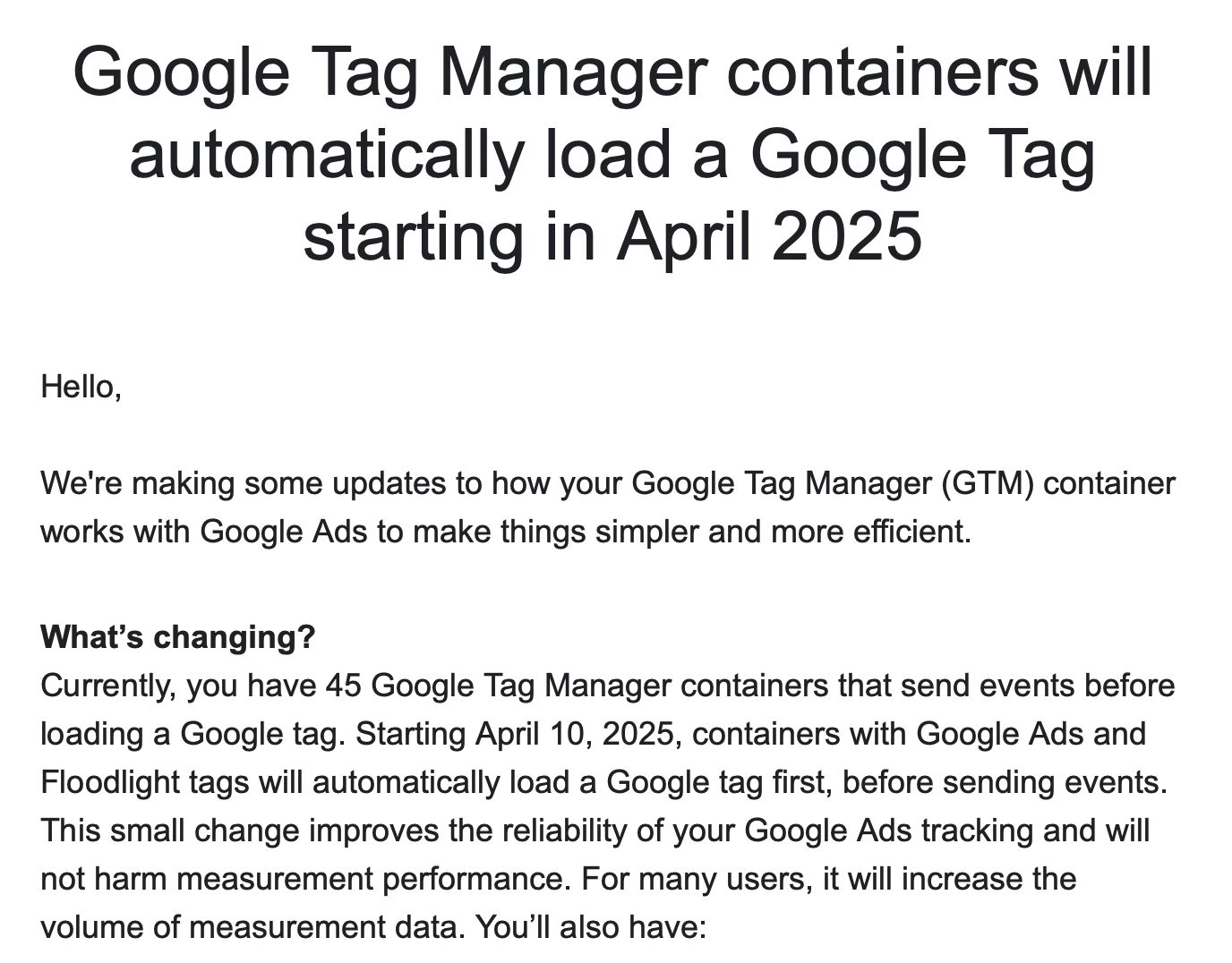
As is typical with Google’s email communications, the email raised more questions than it answered.
Even though I tackled the email in a LinkedIn thread, there’s still a lot of misunderstanding (and misinformation) going about.
In this short article, I’ll explain what Google is going to do on April 10th.X
The Simmer Newsletter
Subscribe to the Simmer newsletter to get the latest news and content from Simo Ahava into your email inbox!
Google Tag is a prerequisite for sending events to Google services
Even though this hasn’t been exactly enforced, if you want to collect events to a Google tagging destination, you need to load a corresponding Google Tag first.
For example, if you want to send an event to a GA4 property with the measurement ID G-12345, then you first need to load a Google Tag with the measurement ID G-12345. If you want to send an Ads conversion for conversion ID AW-12345, then you first need to load a Google Tag with the measurement ID AW-12345.
As said, this hasn’t been exactly enforced, and even without a Google Tag, things have seemed to “work” just fine.
Google Tag Manager has already been auto-loading those Google Tags for you
If you’ve tried to create an event tag in GTM without a Google Tag, perhaps you’ve noticed that Google automatically loads the gtag.js library for that measurement ID before the event is dispatched. So this is Google Tag Manager fixing your “mistake” for you.
The only thing is that the Google Tag that gets loaded has most of its settings toggled off. It doesn’t send the automatic page view, and enhanced measurement events (outbound links, scrolls, video engagement, etc.) don’t seem to work.
What will happen on April 10th?
On April 10th, Google Tag Manager will change how it automatically loads the gtag.js library for Ads and Floodlight events that fire without a corresponding Google Tag loading first.
Importantly, Google Tag Manager has already been doing this for a long time. If you have an Ads or Floodlight event that fires without a Google Tag loaded first, GTM already loads the corresponding gtag.js file automatically. However, this has many of the configured settings toggled off (e.g. automatic event detection, user-provided data). From April 10th, the automatically loaded Google Tag will have all the settings enabled that were enabled in the Google Tag’s configuration.
The heuristic is this:
- When an event is triggered, Google Tag Manager checks the page if the Google Tag for the event’s conversion ID or advertiser ID has already been loaded.
- If it detects the Google Tag, then nothing else happens – the event fires as it should.
- If it doesn’t detect a previously loaded Google Tag, then GTM automatically loads the missing Google Tag with its full configuration and only after the Google Tag has loaded does the event fire.
Additionally, if the Google Tag has allowed user-provided data capabilities AND if enhanced conversions have been toggled on in Ads or Floodlight settings, then the Google Tag configuration that is automatically loaded will enable UPD collection on the page.
This wasn’t possible previously, because without a valid Google Tag loaded before the Ads / Floodlight event fires, UPD collection wouldn’t get enabled.
If you want to disable UPD collection, then you can still go to Google Tag or the individual Ads / Floodlight product settings and toggle it off. These settings will not be touched in the April 10th change.
Frequently asked questions
Here’s a non-comprehensive list of answers to questions that people have been asking about the upcoming change.
- This will only impact Ads and Floodlight event collection. Google Analytics 4 is not included in this update.
- No new tags or changes are made to your actual Google Tag Manager container. The auto-loading of Google Tag is done as a network request directly by the Google Tag Manager library.
- There is no difference between what is automatically loaded and what would be loaded if you created a Google Tag manually in the container.
- Because of (3), you should absolutely create the Google Tag manually in the Google Tag Manager container to avoid the auto-loading behavior. Anything that happens automatically is difficult to audit, and the fact that event tags now need to wait for the Google Tag to load might cause a race condition that delays the event unfavorably.
- User-provided Data collection is not suddenly enabled across your Ads and Floodlight setups. The Google Tag that is auto-loaded will respect the settings you have selected in Google Tag and Ads / Floodlight.
- It’s a good idea to double-check before April 10th that you have disabled/enabled UPD in Google Tag and Ads / Floodlight, based on your preference.
- The increase in conversion volume that Google alludes to in the email is most likely due to UPD working correctly after the auto-loading. Also, some Ads conversions rely on URL goals, which might not have worked properly without a Google Tag loading in the container first.
- All Google tagging destinations require a Google Tag. Remarketing, conversions, Floodlight sales, Google Analytics 4… if you have a tag that sends data to Google, you need to load a Google Tag for that product ID first.
- You can continue loading those Google Tags as destinations of another product. The change on April 10th only checks if a Google Tag has loaded – it doesn’t care how it was loaded. If the Google Tag was loaded as a destination, it would count as having loaded on the page.
- This auto-loading has no impact on how consent is handled in GTM. The auto-loading happens when your Ads / Floodlight events fire. So if those Ads / Floodlight event tags respect consent, then the Google Tag will do so, too.
- If you’re collecting Ads or Floodlight events via server-side Google Tag Manager, then nothing will change. The change only applies to web containers that fire Ads or Floodlight event tags.
Yes, GTM checks the page, not individual containers. As long as the page has loaded the Google Tag (it doesn’t matter how it does this or through which container), it won’t auto-load anything.
M
Matteo Pagni
Hi Simo, first of all thank you very much, as usual, for the depth and the quality of your insights. You keep rockin’! Due to some peculiarity of the environment we move in, we use custom cookie prefix for our Google Ads Conversion tag and Conversion Linker tag. We still did not manually implement the Google Tag in out GTMs.
While Google Tag supports the cookieprefix parameter, running some tests we’ve regularly tracked conversion both with the cookieprefix parameter matching the other two (Conversion and Conversion Linker) or without any customization. Which is your point of view on this behaviour and your suggestion for the incoming future?
Considering that you don’t consider leave Google works automatically (totally on your side on this), would you manually implement all Google Tags with or without the cookie_prefix parameter?
To make things even less clear for me is that in the Google Tag’s suggestion dropdown menu for the Configuration Parameter a conversioncookieprefix parameter is present, but I could not find any info about that. Do you have any?
Thank you very much for your help!
T
Trisha Shah
Hi Simo, We do not have Google Ads/ floodlight tag in GTM but importing GA events as conversions in Google Ads account. Do we need to set up Google tag (for Google Ads)?